
🔄 Why You Need to Reestablish Your Token
-
Social channel tokens expire every 60 days by default.
-
If you've recently changed your password, adjusted page permissions, or removed Pollen as a connected business integration, the token will break.
-
When your token expires or is missing required permissions, Pollen won’t be able to post on your connected pages.
✅ How to Reconnect Your Social Channels in Pollen
-
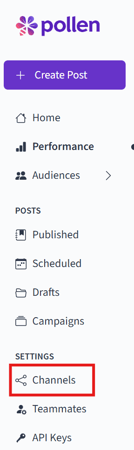
Go to your Channels tab in Pollen.
-
Under the channel, click the “Disconnect” button.
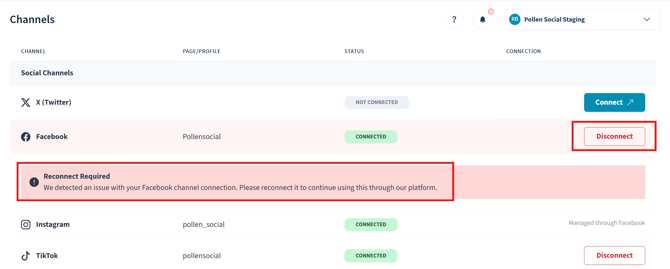
- Once you disconnect your account, you are going to want to press the "Connect" button.
-
A login screen will appear. Log in using the account that has Admin access to the Page and account you want to connect.
-
Make sure to grant all requested permissions when prompted, this is necessary for posting and analytics features to work correctly.
-
Once reconnected, you’ll see a confirmation and your accounts should be fully functional again!
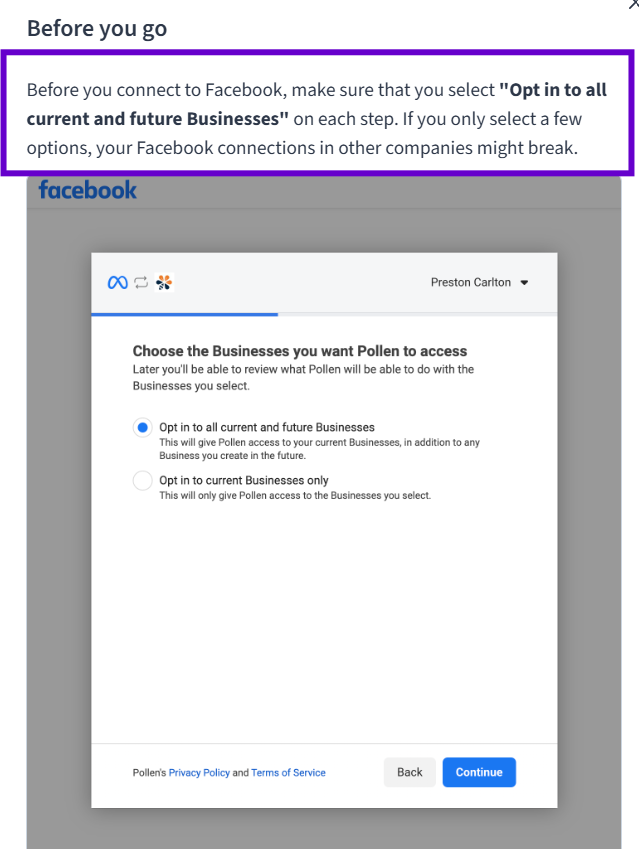
Tip: Before you connect to Facebook, make sure that you select "Opt in to all current and future Businesses" on each step. If you only select a few options, your Facebook connections in other companies might break.
🛠 Still Having Issues?
-
Double-check that you are an Admin (not just Editor or Moderator) on the Facebook Page.
-
Clear your browser cache and try again in a private/incognito window.
If you’ve followed these steps and are still running into issues, please contact our support team or submit a ticket directly in the Help tab inside your Pollen dashboard.